
ASUS ROG Xbox Ally X Review
It’s been hinted at and rumoured for over 20 years, but finally, Microsoft technically enters the handheld market with the ASUS ROG Xbox Ally and Xbox Ally X. I say “technically” because this is an iteration on the existing ASUS ROG Ally handhelds, rather than something built from the ground up, but it’s also a bit more than that.
Full disclosure, I received the ROG Xbox Ally X for this review two days after the price of Xbox Game Pass Ultimate went up. To say that cast something of a shadow over the experience would be an understatement, especially since I knew that I’d have to return it once I was finished with it.

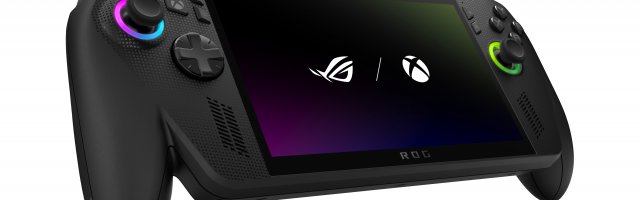
In the box was a power block and lead, warranty information, a Quick Start guide, and a cardboard stand. The handheld unit itself is well put together, and all of the face buttons work properly, as do the four triggers and two buttons on the rear. The new “handles” design and larger triggers help the unit feel better to hold.
There are two USB-C ports along the top, and while they can both be used with the power block, only one of them is for fast charging and handily marked as such. There is also a 3.5mm audio jack and a micro-SD card reader along the top.

Let’s get the technical stuff out of the way:
- CPU: AMD Ryzen AI Z2 Extreme Processor 2.0GHz (24MB Cache, up to 5.0GHz, 8 cores, 16 Threads); AMD XDNA NPU up to 50 TOPS
- GPU: AMD Radeon Graphics, operating wattage: 7-35W
- Display: 7-inch FHD (1920 x 1080) 16:9 IPS-level glossy display
- Memory: 24GB LPDDR5X-8000 dual-channel memory
- Storage: 1TB PCIe 4.0 NVMe M.2 SSD (2280)
The CPU and GPU are better than in the Xbox Ally, and it has more memory and storage, plus a different battery. This all makes it weigh 715 g (1.58 lbs).
The Xbox Ally X has two operating modes. While it can load into Windows 11 perfectly fine, the new Xbox full-screen experience makes it feel more like a console. It feels like a Big Picture Mode for the desktop Xbox app, and can launch all of your installed games directly, as well as anything on Xbox Cloud Gaming. You can swap to full Windows whenever you like, and when switching back, you can choose whether or not to restart first. It might impact performance if you don’t, depending on the game.

When first setting up the device, Microsoft has improved the experience compared to regular Windows 11, removing unnecessary options and making it more suitable for a smaller screen without the benefit of a mouse and keyboard.
All of the games that I tried playing worked perfectly. Except for ones which are, for some reason, listed on Steam as having controller support but don’t actually support them… From a technical standpoint, in any case, they all worked fine with no unexpected crashes or frame rate drops.
The only exceptions came when I tried to pause the game, but hit the button situated immediately above the Menu button on the right. While the face buttons are basically the same as on an Xbox controller, above the Menu is the Library button, which immediately takes you to your Xbox library. Above the View button on the left is a Command Center button, and to the left of both of those is an Xbox button.

The Command Center is ROG’s own overlay, giving you quick access to options such as brightness and changing which power mode the Xbox Ally X is using, and you can open the Armoury Crate to change settings, run updates, etc. The Xbox button acts the same as the Xbox Game Bar on Windows, and I think I only accidentally hit that once.
But when having to quickly pause a game, I lost count of the number of times that I hit the Library button. This (technically) minimises the game, and there are many which don’t like to be minimised in the middle of a session. Often, I’d need to force close the game after failed attempts to get it back up and running.
I imagine that I had less trouble with the buttons on the left side, as they are further away from the thumbstick. The ones on the right are almost as close as the X button is, and on the whole, all of the buttons are bunched up closer to the sticks than on an actual Xbox Series X|S controller.

There was an issue with two of the games I tried out that caused the controls to change seemingly at random. I was unable to skip a lengthy intro in one game because it didn’t recognise me holding Y. Another title deleted my save when I tried to load, when B was suddenly doing A’s job. A separate time with the same game, X functioned as B for about 20 seconds.
One game was installed through Game Pass, the other through Ubisoft Connect, so the only thing they had in common was the hardware and operating system. Whichever one caused it, I’ve no idea. It also persisted between Xbox app updates.
I managed to get the Xbox Ally X to output the display to my TV, using the ROG Gaming Charger Dock, which I already owned and regularly use with my Ally. It worked great with my wireless controller attached to the dock, and was nice and smooth on a larger screen.
When downloading games, the speed of the connection surprised me. I know that I have fast internet, but even so, things were swift.

The two front-facing speakers were nice and clear, so I’ve no complaints there. I suffer from tinnitus, so I can’t say that it was categorically better or worse than anything else, but the volume can get quite loud!
If you’re interested in getting a handheld PC, then the ASUS ROG Xbox Ally X definitely gives you the most bang for your buck. And good, because it’s a lot of bucks at $999.99, with the Xbox Ally being just over half the price. At the time of writing, they haven’t yet widely announced that you’ll get three months of Game Pass (in select markets), but usually that comes with the proviso that you aren’t already subscribed, so that might not be the selling point they hope. After all, the majority of people who buy one of these will be those who want to get the most out of their Play Anywhere.




COMMENTS
edny - 05:35pm, 15th October 2025
Great review! The ASUS ROG Xbox Ally X looks like a serious contender in the handheld gaming space—love the power-packed specs and the seamless Xbox integration. That said, at nearly $1,000, it's definitely a premium investment.
Happy gaming!
Acelister - 07:18pm, 20th October 2025 Author
Thanks very much for the comment!
It's definitely pricey, you can get a desktop for much cheaper - but it's not as portable!