
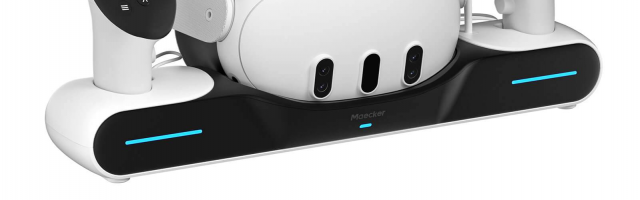
MaeckerVR Charging Station Magnetic Charger for Meta Quest 3 Review
I’ll admit that I never considered getting a charging station for my Meta Quest 2, but when we were offered the MaeckerVR Charging Station Magnetic Charger for Meta Quest 3, I decided to give it a go. It was always a consideration of where to put it, but I figured I could find a home for the thin form factor of this one.
In the box, you get the charging station, a power adaptor, two USB-C cables, a magnetic cable, two rechargeable controller batteries, two replacement battery doors, and two USB-C magnetic connectors. Once you’ve assembled the station (make sure you plug the adapter into “In” and not “Out”, they’re next to each other) and replaced the batteries in your controllers, it’s as easy as putting everything down.
The charging station has holes for the controllers to slot into, and the main body has a recess for the headset itself. The only issue comes if you’re using a third-party headstrap or faceplate, which might interfere with the station. For instance, I use a headstrap with a battery pack on it, so it needs a little adjustment to make it sit properly.

Additionally, if you have something plugged into the Quest 3, you won’t be able to use the magnetic connector unless you’re plugging and unplugging things all the time. And if you’re using the MaeckerVR Direct-Charge Controller Grips for Q3/Q3S, then the controllers won’t fit into the station.
When you insert anything, the station makes a tone to confirm that it’s working, and the front of it has a purple light, which turns blue once charged. The brightness can be toggled or turned off completely, in case you want the room to be a bit darker.
The rechargeable batteries work well, and the replacement doors have connectors to allow them to charge when placed in the station’s recesses. As with all rechargeable lithium batteries, Quest headsets think that they’re not fully charged even when they are, so be aware of that.

I did have a small issue when I plugged something into the Out port, for whatever reason, it stopped charging the Quest 3 until I removed the cable. It may have been a cable issue, but I couldn’t narrow it down. EDIT: The charging station uses a priority charging, so will charge the docked items before it will activate the Out port.
If you’re looking for an elegant charging solution, the MaeckerVR Charging Station Magnetic Charger for Meta Quest 3 is definitely one to consider.
MaeckerVR Charging Station Magnetic Charger for Meta Quest 3 Review
A decent addition to your VR setup, that doesn’t take up a lot of space.


COMMENTS